Monday, July 8, 2013

What We Really Mean When We Talk About Gamification in Education

For every article I read pointing to gamification as a key part of the future of education, there seems to always be a counterpoint about it being some kind of fad. It is admittedly a buzzword, and it will likely fade out of our vocabulary at some point (as all buzzwords eventually do). What it really means will remain a critical part of successful classrooms.

Gamification is not about making everything into a game, engaging players through fun and competition. At it's heart, when we're talking about gamification, we're really talking about positive feedback and reinforcement. Badges, levels, progress meters--these are all simply ways to say you are on the right track. Keep going. You're almost there.

Done right, there's usually no need for material rewards, just the external psychological motivation we all need sometimes. Finding ways to encourage your students to succeed is at the heart of good teaching.  Gold stars, a "Student of the Week" board, positive phone calls home, showing up at a student's athletic or academic competition... these are the most effective badges we can award our students.

Whether or not you explicitly try to gamify your classroom, the game is being played there every day. It's up to you to find out how to help your students win. 

Friday, July 5, 2013

Weekend Reader on Games, Gamification & Education

Can Digital Games Boost Students’ Test Scores? [MindShift] - The short answer is yes, but it's also important to note that simulations seemed to have an even stronger correlation with better test scores. "We shouldn’t frame games, or any other instructional support, as ‘the answer,’" says one Gates Foundation official, but says that the data can't be ignored. "We should be careful not to view learning technologies as a replacement for deep teacher and student interactions. We see effective technology supports as enabling the opposite."

Is Gamification Just a Fad? [Mashable] - Short answer: no.

Games to keep teenage girls enthralled with math, science [The Seattle Times]

Videogames and Learning [blogs.worldbank.org] - A look into the research on how games can be effective in the classroom.

The Game That Will Save Zynga (And Mathematics Education) [This blog] - A learning game idea I came up with last summer, which seems appropriate given the game publisher's business woes. I'm still willing to hear your offer, Zynga.

Coming Monday: my take on gamification and education.

Thursday, July 4, 2013

Independence Day Sale On My Books At Lulu.com


Here's a holiday coupon code for 25% off any order at Lulu.com: FIREWORKS.  It's a great chance to add either of my books to your summer reading pile. It's good until 11:59pm this Friday, so use it quickly!

Monday, July 1, 2013

Basics of Quadratic Functions iPad (Tablet) Project

For the last few years, when my students were learning about the graphs of simple quadratic functions (usually ones in the form y = ax2 + c), they would make posters of quadratic equations and label key parts.  As we discussed solving quadratic equations by graphing, students would make posters explaining the process

Last year, I combined these projects using the iPads our students had available:
BASICS OF QUADRATIC FUNCTIONS IPAD PROJECT
  1. Create a Keynote presentation or video that shows 2 quadratic equations and their graphs (one that opens up and one that opens down).
  2. Label these parts:
    1. Vertex
    2. Axis of symmetry
    3. Roots/zeros (if any)
    4. Minimum or maximum
  3. Show how to tell if a graph opens up or down just from the equation.
  4. Show how to find the vertex using the calculator.
  5. Show how to find the zeros/roots using the calculator.
As with the adaptable iPad project I shared last week, you could also give students the option of using the fantastic Educreations app.

Essentially this is the same project as those simple posters, but it utilizes the technology we had available in a meaningful way. While I would never want to replace every low or no-tech project I use, it's always important to take advantage of the resources you have.

Friday, June 28, 2013

Weekend Reader on Teaching Coding


Kids DIY Game Creation App TinyTap Heads To iPhone, Launches Its Own App Store [TechCrunch]

UT launches video gaming academy [Austin American-Statesman] - Video games are big business, bigger than movies at this point. This is at least part of the reason to incorporate coding into our K-12 curriculum.

How and Why to Teach Your Kids to Code [Lifehacker] - Plus two bonuses from the same site, Learn Beginner and Advanced HTML/CSS Skills for Free and Hopscotch HD Introduces Kids to Programming.

Three Free iPad Apps That Teach Kids To Program [iPad Apps for School via Twitter]

Why You Don’t Need to Go to University to Learn How to Code [GOOD]

How coding might just save our kids [USA Today]

Monday, June 24, 2013

If You're Reading This in Google Reader, You Need To Switch Now

If you've been reading this blog using Google Reader, you're going to need to switch to something else before July 1st, because it's shutting down.  GR had been my feed reader of choice for as long as I can remember, but as soon as I heard the news, I sought out an alternative.

Using this guide by Lifehacker, I decided to try out Feedly, and I can wholeheartedly recommend it. It has a beautiful, easy to read and use interface, both on the web and their smartphone/tablet app. I actually like it better than GR. You can import all of your GR feeds directly into Feedly when you sign up, but you need to do that before Google's service shuts down.

On iPad, Flipboard is also a great option. You could also try a free service like Bloglovin. You could also follow the blog on Facebook, although that seems a bit inefficient to me.

Choose quickly! Remember, you have until July 1st.

Friday, June 21, 2013

Building Internet Savvy Kids

Online 'Driver's Ed' Course Preps Kids for the Social Web [Mashable]

Common Sense Media - This well-established site is a one-stop-shop for parents and teachers looking for help teaching kids to be savvy about all media, including social media.

Teaching Students Better Online Research Skills [Education Week]

You're Being Monitored All the Time — Deal With It [Mashable] - The best way to use the current debate about the government tracking us is to engage your students in a discussion about how easily the government, corporations and anyone else you know can track your whereabouts based on what you do online. Between the data you agree to share or don't own when you sign Privacy Policy agreements and what students decide to freely post, it will be hard for them to be frustrated with anybody but themselves. This particular article should serve as a great discussion piece.

Creatively Designed Posters Educate People About The Perils of Cyberspace [DesignTAXI.com]

Monday, June 17, 2013

Win $1000 in Classroom Supplies from ClassWish & Citgo

Fueling Good in your classroom with ClassWish
ClassWh, an alternative to DonorsChoose where teachers can help get classroom resources, just launched a big giveaway:
109 teachers will each win $1,000 of classroom supplies.

Entering is really quick and easy:
  1. Visit ClassWish.org/FuelingEducation
  2. Find your school
  3. Simply join the site as a teacher
  4. Click the link in the activation email you receive
  5. Then just follow the easy instructions to opt in for a chance to win.
Create a Wish List, opt in to the contest and that will help attract tax-deductible donations for classroom resources from people who care about kids. Also, many companies match employees’ donations, which can double their funding.

Many teachers on the site have already received hundreds of dollars of donations, and some have received as much as $2,000 of supplies. You can get books, computers, art supplies, musical instruments, science equipment, sports equipment, or whatever you want.
Teachers can enter until July 7th. Good luck!

Friday, June 14, 2013

Weekend Reader on Bullying in Schools

Click to enlarge
A Must-See Anti-Bullying Poster Perfect For Classrooms [Edudemic] - More info about the poster below.

School Bullying Prevention Task Force Wants Less Talk, More Action [The Educated Reporter] - I think we all do.

The Next Step to Stop Bullying [Blackboard] - This is a step in the right direction. I think this can be done without a dedicated app, though, if we think the problem through.

Bully: An Action Plan for Teachers, Parents, and Communities to Combat the Bullying Crisis - This acclaimed book is a companion to the documentary of the same name.

At Work: Cyberbullies graduate to workplace [USA Today] - Finally, to hammer home the importance of tackling this problem before kids turn into adults, let's realize that bullying doesn't stop when students are done with school.

Monday, June 10, 2013

An Adaptable iPad Project Idea

Last year was a pilot year with iPads in my district, and my students were part of the first lucky group to get them. Teachers were mostly left to their own imaginations to dream up ways to incorporate them into our instruction.  For this simple project, my students used their iPads to produce content instead of consume it.

In this example, we were working on factoring expressions, but you could do this project with any topic you are working on.  Students simply had to either make a video or presentation where they both visually and verbally explained how to solve example problem drawn from workbooks we used regularly (you could use any convenient source).
FACTORING iPAD PROJECT
MMA 11th
Mr. DeRosa

In this project you will show how to solve 4 types of factoring problems (choosing examples from the given pages):
  1. Factoring by GCF  (workbook pg 55)
  2. Factoring x2 + bx + c  (pg 56)
  3. Factoring ax2 + bx + c  (pg 57)
  4. Factoring Special Products  (pg 58)
Because you have to explain how to do the problems and show the steps involved, you have two options:

Option 1: Make videos of you working out the problem on paper or on a whiteboard (you can use the one in the classroom). How to submit:
  • Submit the videos by sending via message
  • Send it directly to me via message on Facebook.
Option 2: Download the free Educreations app from the App Store to record yourself explaining the example. How to submit:
  • Create an Educreations account, then send me a link to your presentation by email or text message.
  • Email for submission is thomas.derosa@myschooldistrict.net.
Educreations works like a virtual whiteboard on your tablet, recording what you see as well as audio.  You can start with a blank slate or add content before recording, such as an image you might want to draw on.  Creating and sharing presentations is simple, and for camera-shy students, it's better than requiring a video.

This might seem a bit too simple, but that's the point. This small scale project can replace tedious independent practice that might involve them doing problems out of a workbook or worksheet. The creativity involved is a way to engage your kids and get them to use their tablets for learning.

Have you used iPads or other tablets in similar ways? Share your ideas in the comments.

Friday, June 7, 2013

Beyond Facebook & Twitter: Using New Social Networks in Schools

Social Media Explained (with Donuts)

It seems Facebook is losing it's grip on young people as new (and less parent-filled) social networks pop-up. Twitter has certainly become very popular among young people in my area, to the point where schools are paying close attention.  I've shared lots of resources for using these networks, but it's time to give a serious look at how to use other social platforms in schools:

5 Best Tips For Using Pinterest In The Classroom [HowToLearn.com]

Using Instagram in an Educational Context [Emerging Education Technology]

How To Use Vine In The Classroom [Edudemic] - Vine is made by the people behind Twitter, but the bite-sized video app can be used independently.

Teachers, Youth, and Social Media: Experiments [DMLcentral] - Food for thought on using private social networks for just teachers and students, with some ideas that should carry across to other networks.

It’s a ‘like’: The IGGY networking site for smart pupils is a hit [The Independent UK] - A new social media network is aimed at "smart" teens, or more precisely, teens who want to talk about important issues and not waste away their time online. While I'm not usually an advocate for reinventing the wheel, there's a lot to think about here.

Monday, June 3, 2013

Book Review and Giveaway: The Perfect Teacher Coach

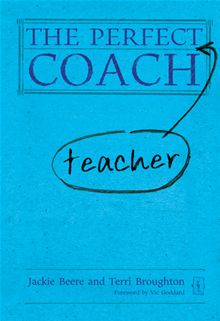
The Perfect Teacher Coach
The Perfect Teacher Coach by Jackie Beer and Terri Broughton is a concise, thoughtful guide to becoming an effective instructional coach.  The two UK-based experts draw on years of teaching and coaching in a variety of settings, providing a clear blueprint of what coaching is and isn't.

I found their framework for coaching very similar to what I learned both from Teach For America and in graduate school,  In short, coaching is not about telling teachers what is wrong and how to fix it, but giving them the tools and encouragement to do so themselves.  Coaches are great listeners who ask the right questions and provide a positive, unwavering belief that teachers can find the right answers within.

It should come as no surprise that the elements that make a great coach of teachers also make a great classroom teacher.  I was always taught to constantly reflect on my practice, get feedback from my students and outside observers, identify weaknesses and find solutions. When I did a good job of all of those things, my classroom was at its peak effectiveness.  This is also the message of The Perfect Teacher Coach.

Whether you already coach teachers, have such a role on the horizon for next year or beyond, or are still just trying to improve in your own classroom, there's a lot to learn from this new guide.  I highly recommend it.

As usual, I'm holding a giveaway of my copy of the book! The book will not be released until July 16, so one lucky reader will be one of the first to get their hands on it.  If you're interested in the book, send an email to teachforever@gmail.com with the subject "The Perfect Teacher Coach" by 11:59pm CST this Wednesday, June 5.  I'll pick a winner at random. Good luck!

Pre-order The Perfect Teacher Coach on Amazon.